
Write or import a note, review its text, and save a copy in the format that suits the next step. Follow the exact input and settings below to reproduce this example. Open Notepad Text Editor.
Prepare the source text
Open Notepad Text Editor and choose Write or paste text, or upload a supported UTF-8 text file. The upload opens the editor; it does not run the tool. This example uses the exact source shown in the comparison.
Maximum imported file and plain-text result: 1 MB, with a 1,048,576-character input ceiling. HTML export includes additional formatting markup.
Use the exact example input
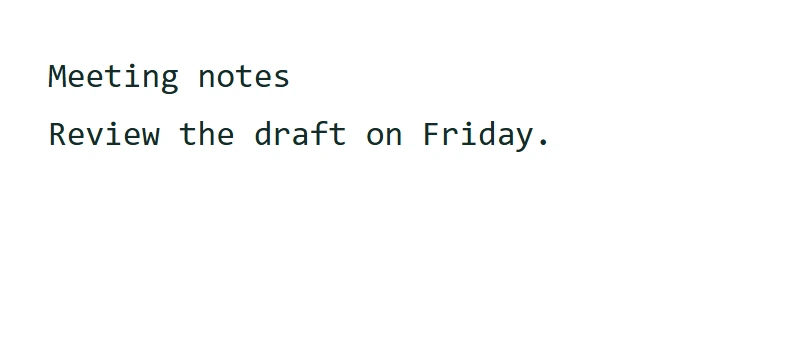
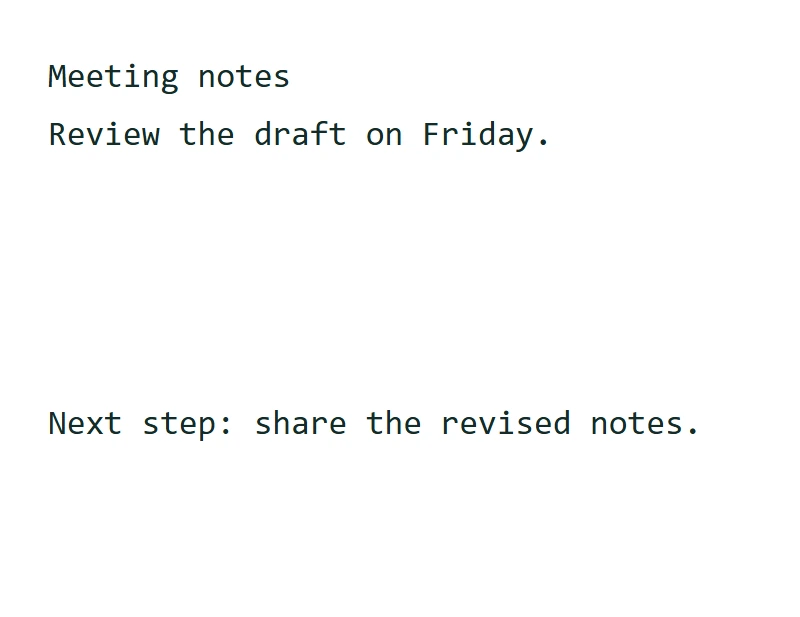
Meeting notes
Review the draft on Friday.
This text operation runs in your browser; its source and result are not sent for conversion. A draft may be kept in this browser tab when session storage is available. Clear removes the current draft; download important work before closing the tab.
Make the edit
Make an actual change in the editor before reviewing the result. Appended: Next step: share the revised notes.
Start with Write text, an imported UTF-8 text file or the sample. Edit the note in the browser, then choose Review text to see the output. The workspace keeps a draft in this browser tab when session storage is available; Clear removes the current saved draft.
The example in this guide
Verified in the i2TEXT browser workflow on November 11, 2026.
- Input
- example.txt
- Output
- notepad-text-editor.txt
- Saved result
- 84 bytes
Apply and inspect the result
Select Review text when the input and settings are ready. In the saved example, the result begins: "Meeting notes".
Browser drafts are a convenience, not permanent storage or synchronized cloud documents. Download important notes before closing the tab.
Save the version you reviewed
Review the current result, then use Download text to save a TXT file. The actual download in this example is named notepad-text-editor.txt. Copy and download use the current result, so make any final wording changes before saving. HTML is available separately; Save as PDF opens the browser print workflow.
example.txtnotepad-text-editor.txt
Common questions
Which settings produced this example?
The example adds the sentence described in step 2 before Review text.
What should I check before using the result?
Browser drafts are a convenience, not permanent storage or synchronized cloud documents. Download important notes before closing the tab.
Where is this text processed?
This text operation runs in your browser; its source and result are not sent for conversion. A draft may be kept in this browser tab when session storage is available. Clear removes the current draft; download important work before closing the tab.
Try Notepad Text Editor with your own text.
Use your own source and review the result before sharing.