
Replace angle brackets, ampersands and quotation marks with their HTML entity forms. Follow the exact input and settings below to reproduce this example. Open HTML Escape.
Prepare the source text
Open HTML Escape and choose Write or paste text, or upload a supported UTF-8 text file. The upload opens the editor; it does not run the tool. This example uses the exact source shown in the comparison.
Maximum input and result: 1 MB of UTF-8 text, with a 1,048,576-character input ceiling. Expanding transformations must also fit the result limit.
Use the exact example input
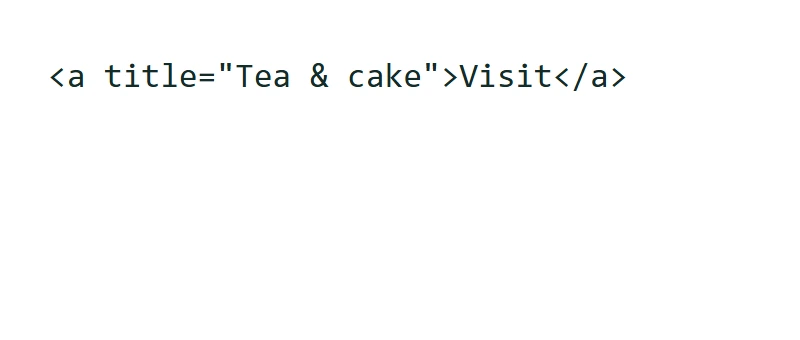
<a title="Tea & cake">Visit</a>
This text operation runs in your browser; its source and result are not sent for conversion. A draft may be kept in this browser tab when session storage is available. Clear removes the current draft; download important work before closing the tab.
Check how the tool works
This tool has no extra transformation options to set. Keep the source exactly as shown to compare the result.
Ordinary letters and other symbols remain unchanged. This is useful when a markup example should be represented as text. Existing entity strings contain ampersands, so escaping them again adds another encoding layer. Use HTML Unescape when you need to reverse a suitable escaped string.
The example in this guide
Verified in the i2TEXT browser workflow on November 11, 2026.
- Input
- example.txt
- Output
- html-escape.txt
- Saved result
- 57 bytes
Apply and inspect the result
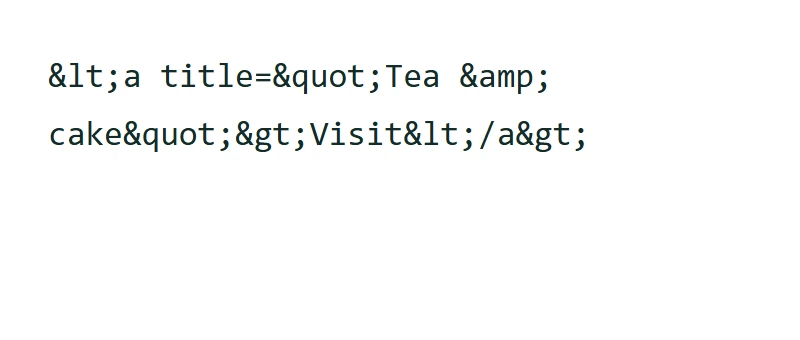
Select HTML Escape when the input and settings are ready. In the saved example, the result begins: "<a title="Tea & cake">Visit</a>".
Escaping here is a text transformation, not a full security check for a webpage. Different code, URL and attribute contexts can require different handling.
Inspect the escaped markup in the monospaced result and compare input and result UTF-8 byte sizes in Result overview. The byte comparison measures the text representation; it does not verify whether the result is safe for a particular application context.
Result overview distinguishes changed, unchanged and empty results. An unchanged result means the selected operation did not alter the text; an empty result can be the expected outcome of removal or extraction. Open Show spaces and tabs to reveal spaces as ·, tabs as ⇥ and line endings as ↵. These marks are only a preview; copied and downloaded text keeps its actual whitespace. The whitespace preview shows at most 12,000 Unicode code points. This preview limit does not shorten the editable result or its TXT download.
Save the version you reviewed
Review the current result, then use the download icon to save a TXT file. The actual download in this example is named html-escape.txt. Copy and download use the current result, so make any final wording changes before saving. Continue to can carry the result into a compatible next tool, where you review it before running another operation.
Editing the result hides the calculated details until you run the tool again. Copy and TXT download use the edited text; return to the source and reapply the tool to refresh the report.
example.txthtml-escape.txt
Common questions
Which settings produced this example?
No extra transformation settings were required. The source and actual output are shown in the comparison.
What should I check before using the result?
Escaping here is a text transformation, not a full security check for a webpage. Different code, URL and attribute contexts can require different handling.
Where is this text processed?
This text operation runs in your browser; its source and result are not sent for conversion. A draft may be kept in this browser tab when session storage is available. Clear removes the current draft; download important work before closing the tab.
Try HTML Escape with your own text.
Use your own source and review the result before sharing.