

Describe the message, audience and desired response to generate a tweet-style draft. Follow the workflow with the input and settings below. AI results may vary between runs. Open AI Tweet Generator.
Write a focused brief
Open AI Tweet Generator and enter the brief in Your topic or instructions. Try a sample is available if you want a starting point. This example uses the exact source shown in the comparison.
Maximum input: 1,000 characters and 64 KB of UTF-8 data. Result limit: 1 MB. Generation preferences do not guarantee an exact word count.
Use the exact example input
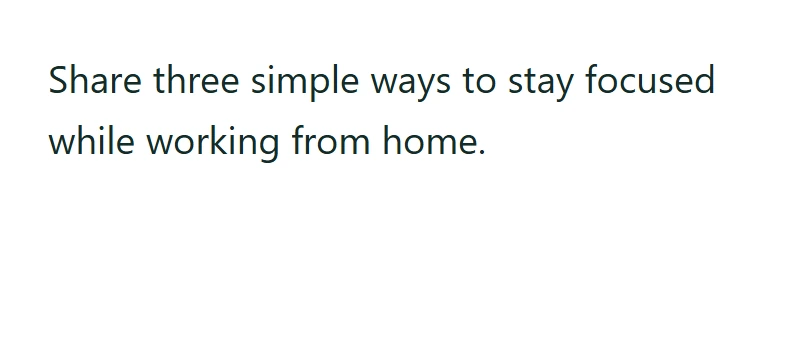
Share three simple ways to stay focused while working from home.
Your text and selected writing options are sent for server-side AI processing when you select Generate text. Temporary text-processing files are removed when the request finishes. A browser-tab draft may remain until cleared or the session ends.
Choose the settings
For the recorded example, use these settings: Output language: English; Tone: Formal.
Include relevant facts and wording that should stay, then choose output language and tone. Review the draft in the result editor. This is a text-writing tool; it does not connect to an account, attach media or publish a post.
The example in this guide
Verified in the i2TEXT browser workflow on November 11, 2026.
- Input
- example.txt
- Output
- ai-tweet-generator.txt
- Saved result
- 283 bytes
Apply and inspect the result
Select Generate text when the input and settings are ready. This submits the processing request; loading a sample or changing an option alone does not submit it. In the saved example, the result begins: "To maintain peak productivity while working remotely, consider these three strategies: establish a dedicated workspace, adhere to a structured daily schedule, and utilize the...".
The generated draft is not guaranteed to fit a platform character limit, and URLs or special characters may be counted differently there.
Save the version you reviewed
Review the current result, then use Download text to save a TXT file. The actual download in this example is named ai-tweet-generator.txt. Copy and download use the current result, so make any final wording changes before saving. Continue to can carry the result into a compatible next tool, where you review it before running another operation.
example.txtai-tweet-generator.txt
Common questions
Which settings produced this example?
Output language: English; Tone: Formal.
What should I check before using the result?
The generated draft is not guaranteed to fit a platform character limit, and URLs or special characters may be counted differently there.
Where is this text processed?
Your text and selected writing options are sent for server-side AI processing when you select Generate text. Temporary text-processing files are removed when the request finishes. A browser-tab draft may remain until cleared or the session ends.
Try AI Tweet Generator with your own text.
Use your own source and review the result before sharing.